Description
iPhone 7 Top Left Antenna
Replace a torn or missing antenna contact assembly in the top left of the rear case of your iPhone 7 and fix cellular connectivity problems.


$8.00
Replace a torn or missing antenna contact assembly in the top left of the rear case of your iPhone 7 and fix cellular connectivity problems.
Replace a torn or missing antenna contact assembly in the top left of the rear case of your iPhone 7 and fix cellular connectivity problems.
| iPhone 7 Top Left Antenna remove | iPhone 7/7 Plus/8/8 Plus Replacement Home Button remove | iPhone 7/7 Plus Power and Volume Button Gaskets remove | iPhone 6s/6s Plus/7/7 Plus Backlight Filter remove | iPhone 7/7 Plus Lightning Connector Grounding Spring Contact remove | iPhone 7/7 Plus Power/Volume Button Retaining Clips remove | |||||||||||||||||||||||||||||||||||||||
|---|---|---|---|---|---|---|---|---|---|---|---|---|---|---|---|---|---|---|---|---|---|---|---|---|---|---|---|---|---|---|---|---|---|---|---|---|---|---|---|---|---|---|---|---|
| Name | iPhone 7 Top Left Antenna remove | iPhone 7/7 Plus/8/8 Plus Replacement Home Button remove | iPhone 7/7 Plus Power and Volume Button Gaskets remove | iPhone 6s/6s Plus/7/7 Plus Backlight Filter remove | iPhone 7/7 Plus Lightning Connector Grounding Spring Contact remove | iPhone 7/7 Plus Power/Volume Button Retaining Clips remove | ||||||||||||||||||||||||||||||||||||||
| Image |  | 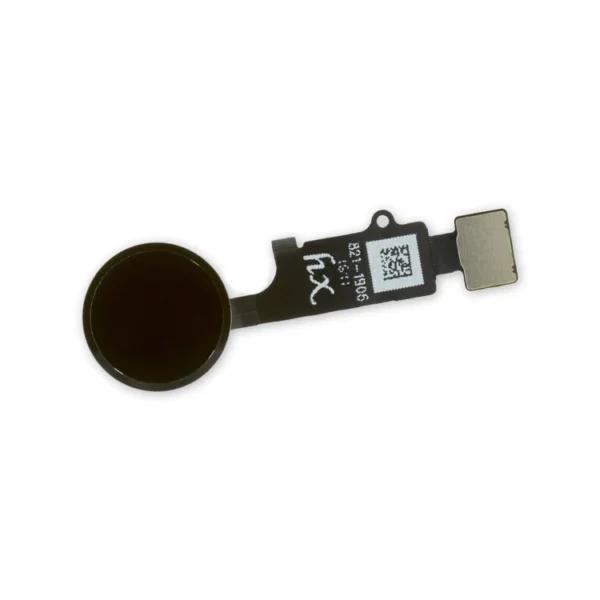 |  |  |  |  | ||||||||||||||||||||||||||||||||||||||
| SKU | iPhone 7 Top Left Antenna | iPhone 7/7 Plus/8/8 Plus Replacement Home Button | iPhone 7/7 Plus Power and Volume Button Gaskets | iPhone 6s/6s Plus/7/7 Plus Backlight Filter | iPhone 7/7 Plus Lightning Connector Grounding Spring Contact | iPhone 7/7 Plus Power/Volume Button Retaining Clips | ||||||||||||||||||||||||||||||||||||||
| Rating | ||||||||||||||||||||||||||||||||||||||||||||
| Price | $8.00 | $21.00 | $9.00 | $4.00 | $6.00 | $4.00 | ||||||||||||||||||||||||||||||||||||||
| Stock | ||||||||||||||||||||||||||||||||||||||||||||
| Availability | ||||||||||||||||||||||||||||||||||||||||||||
| Add to cart | ||||||||||||||||||||||||||||||||||||||||||||
| Description |
Replace a torn or missing antenna contact assembly in the top left of the rear case of your iPhone 7 and fix cellular connectivity problems. | Replace a home button assembly in your iPhone 7/7 Plus/8/8 Plus and fix an unresponsive home button. | Includes 6 gaskets.
Replace any or all of this set of six o-ring gaskets for the power or volume button face posts in an iPhone 7 or iPhone 7 Plus. Each of the volume button faces and the power button face have two posts that extend to the interior of the phone. Each post has a tiny gasket. That makes six gaskets for one phone or two for each button face. | Replace a backlight filter on the logic board of the following iPhone models with their component labels:
|
Replace the spring contact that grounds the lightning connector assembly to the back of the home button bracket in your iPhone 7 or iPhone 7 Plus. | Replace the internal clips that hold the external button covers in place. These clips snap over the posts on the inside of the power and volume button covers, preventing the button covers from falling out of the iPhone's case. Set of three clips. | ||||||||||||||||||||||||||||||||||||||
| Content | iPhone 7 Top Left AntennaReplace a torn or missing antenna contact assembly in the top left of the rear case of your iPhone 7 and fix cellular connectivity problems. | iPhone 7/7 Plus/8/8 Plus Replacement Home ButtonReplace a home button assembly in your iPhone 7/7 Plus/8/8 Plus and fix an unresponsive home button. | iPhone 7/7 Plus Power and Volume Button GasketsIncludes 6 gaskets.Replace any or all of this set of six o-ring gaskets for the power or volume button face posts in an iPhone 7 or iPhone 7 Plus. Each of the volume button faces and the power button face have two posts that extend to the interior of the phone. Each post has a tiny gasket. That makes six gaskets for one phone or two for each button face. | iPhone 6s/6s Plus/7/7 Plus Backlight FilterReplace a backlight filter on the logic board of the following iPhone models with their component labels:
| iPhone 7/7 Plus Lightning Connector Grounding Spring ContactReplace the spring contact that grounds the lightning connector assembly to the back of the home button bracket in your iPhone 7 or iPhone 7 Plus. | iPhone 7/7 Plus Power/Volume Button Retaining ClipsReplace the internal clips that hold the external button covers in place. These clips snap over the posts on the inside of the power and volume button covers, preventing the button covers from falling out of the iPhone's case. Set of three clips. | ||||||||||||||||||||||||||||||||||||||
| Weight | N/A | N/A | N/A | N/A | N/A | N/A | ||||||||||||||||||||||||||||||||||||||
| Dimensions | N/A | N/A | N/A | N/A | N/A | N/A | ||||||||||||||||||||||||||||||||||||||
| Additional information |
|
|
|
|
|
|


Reviews
There are no reviews yet.