| SKU | iPhone 7/7 Plus Power/Volume Button Retaining Clips | iPhone 7 Top Right Antenna | iPhone 7/7 Plus SIM Card Tray Gasket | iPhone 7/7 Plus Power and Volume Button Gaskets | iPhone 7/7 Plus Hold Switch Gasket | iPhone 7 Lightning Connector Assembly |
| Description | Replace the internal clips that hold the external button covers in place.
These clips snap over the posts on the inside of the power and volume button covers, preventing the button covers from falling out of the iPhone's case.
Set of three clips. |
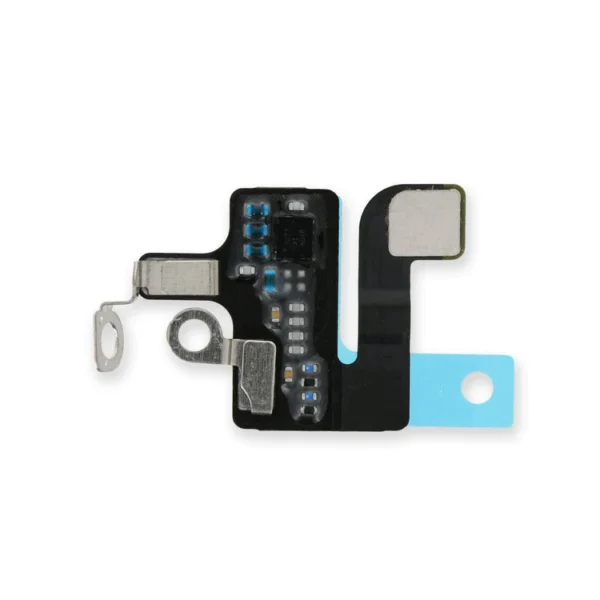
- Replace a torn or missing antenna contact assembly in the top right of the rear case in your iPhone 7.
- Fix Wi-Fi connectivity problems.
| Replace a torn or missing gasket on the SIM card tray for an iPhone 7 or iPhone 7 Plus. This gasket fits just inside the exterior face of the SIM card tray. | Includes 6 gaskets.
Replace any or all of this set of six o-ring gaskets for the power or volume button face posts in an iPhone 7 or iPhone 7 Plus.
Each of the volume button faces and the power button face have two posts that extend to the interior of the phone. Each post has a tiny gasket. That makes six gaskets for one phone or two for each button face. |
Replace a torn or missing gasket on the hold button assembly for an iPhone 7 or iPhone 7 Plus. This gasket fits around the body of the hold button assembly. | Replace a corroded or damaged lightning connector assembly in your iPhone 7.
If your phone isn't charging, has connectivity problems, is not recognized when plugged into your computer via USB, or has trouble recording audio, this part could fix the problem.
Specifications:
|
| Content | iPhone 7/7 Plus Power/Volume Button Retaining Clips
Replace the internal clips that hold the external button covers in place.
These clips snap over the posts on the inside of the power and volume button covers, preventing the button covers from falling out of the iPhone's case.
Set of three clips. | iPhone 7 Top Right Antenna
- Replace a torn or missing antenna contact assembly in the top right of the rear case in your iPhone 7.
- Fix Wi-Fi connectivity problems.
| iPhone 7/7 Plus SIM Card Tray Gasket
Replace a torn or missing gasket on the SIM card tray for an iPhone 7 or iPhone 7 Plus. This gasket fits just inside the exterior face of the SIM card tray. | iPhone 7/7 Plus Power and Volume Button Gaskets
Includes 6 gaskets.
Replace any or all of this set of six o-ring gaskets for the power or volume button face posts in an iPhone 7 or iPhone 7 Plus.
Each of the volume button faces and the power button face have two posts that extend to the interior of the phone. Each post has a tiny gasket. That makes six gaskets for one phone or two for each button face. | iPhone 7/7 Plus Hold Switch Gasket
Replace a torn or missing gasket on the hold button assembly for an iPhone 7 or iPhone 7 Plus. This gasket fits around the body of the hold button assembly. | iPhone 7 Lightning Connector Assembly
Replace a corroded or damaged lightning connector assembly in your iPhone 7.
If your phone isn't charging, has connectivity problems, is not recognized when plugged into your computer via USB, or has trouble recording audio, this part could fix the problem.
Specifications:
|





Reviews
There are no reviews yet.