Description
iPhone 7 Plus Top Left Antenna
Replace the antenna in the top left of the rear case in your iPhone 7 Plus.


$8.00
Replace the antenna in the top left of the rear case in your iPhone 7 Plus.
Replace the antenna in the top left of the rear case in your iPhone 7 Plus.
| iPhone 7 Plus Top Left Antenna remove | iPhone 7 Plus Test Cable for LCD Screen and Digitizer remove | iPhone 7 Plus/8 Plus Home Button Bracket remove | iPhone 7 Plus Bare Logic Board remove | iPhone 7 Plus Front Camera and Sensor Cable remove | iPhone 7/7 Plus Test Cable for Audio Control Cable remove | |||||||||||||||||||||||||
|---|---|---|---|---|---|---|---|---|---|---|---|---|---|---|---|---|---|---|---|---|---|---|---|---|---|---|---|---|---|---|
| Name | iPhone 7 Plus Top Left Antenna remove | iPhone 7 Plus Test Cable for LCD Screen and Digitizer remove | iPhone 7 Plus/8 Plus Home Button Bracket remove | iPhone 7 Plus Bare Logic Board remove | iPhone 7 Plus Front Camera and Sensor Cable remove | iPhone 7/7 Plus Test Cable for Audio Control Cable remove | ||||||||||||||||||||||||
| Image |  | 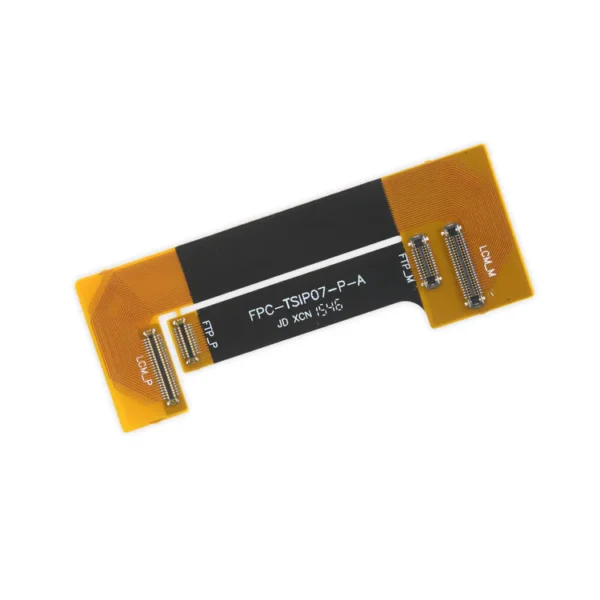 |  | 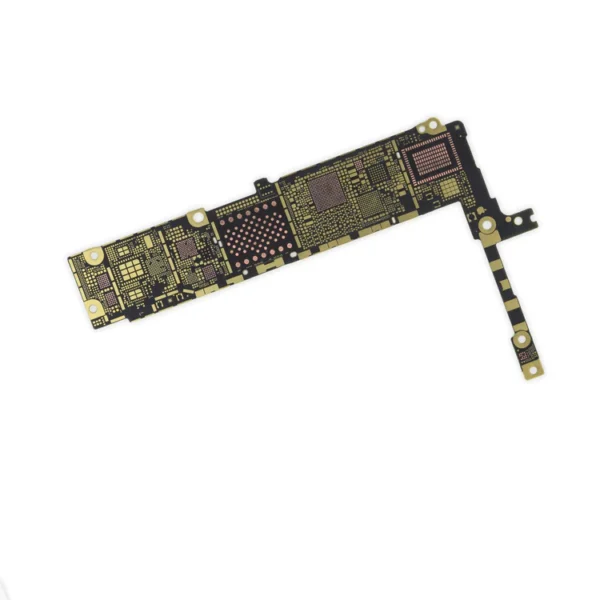 |  |  | ||||||||||||||||||||||||
| SKU | iPhone 7 Plus Top Left Antenna | iPhone 7 Plus Test Cable for LCD Screen and Digitizer | iPhone 7 Plus/8 Plus Home Button Bracket | iPhone 7 Plus Bare Logic Board | iPhone 7 Plus Front Camera and Sensor Cable | iPhone 7/7 Plus Test Cable for Audio Control Cable | ||||||||||||||||||||||||
| Rating | ||||||||||||||||||||||||||||||
| Price | $8.00 | $16.00 | $7.00 | $11.00 | $32.00 | $11.00 | ||||||||||||||||||||||||
| Stock | ||||||||||||||||||||||||||||||
| Availability | ||||||||||||||||||||||||||||||
| Add to cart | ||||||||||||||||||||||||||||||
| Description | Replace the antenna in the top left of the rear case in your iPhone 7 Plus. |
| Replace a missing or bent metal bracket securing the home button assembly to the back of the display assembly and fix a misaligned home button. | Replace a bare logic board (with no components) for the iPhone 7 Plus.
This is only the board to which all the surface soldered components would be mounted. | Replace a front-facing camera and sensor cable in your iPhone iPhone 7 Plus and fix problems with front-facing camera images, poor noise cancelling for phone calls, or malfunctioning screen brightness adjustment.
Specifications:
|
| ||||||||||||||||||||||||
| Content | iPhone 7 Plus Top Left AntennaReplace the antenna in the top left of the rear case in your iPhone 7 Plus. | iPhone 7 Plus Test Cable for LCD Screen and Digitizer
| iPhone 7 Plus/8 Plus Home Button BracketReplace a missing or bent metal bracket securing the home button assembly to the back of the display assembly and fix a misaligned home button. | iPhone 7 Plus Bare Logic BoardReplace a bare logic board (with no components) for the iPhone 7 Plus.This is only the board to which all the surface soldered components would be mounted. | iPhone 7 Plus Front Camera and Sensor CableReplace a front-facing camera and sensor cable in your iPhone iPhone 7 Plus and fix problems with front-facing camera images, poor noise cancelling for phone calls, or malfunctioning screen brightness adjustment. Specifications:
| iPhone 7/7 Plus Test Cable for Audio Control Cable
| ||||||||||||||||||||||||
| Weight | N/A | N/A | N/A | N/A | N/A | N/A | ||||||||||||||||||||||||
| Dimensions | N/A | N/A | N/A | N/A | N/A | N/A | ||||||||||||||||||||||||
| Additional information |
|
|
|
|
|
|


Reviews
There are no reviews yet.