| Description |
- This handy test cable makes it easy to check the functions of an iPhone 7 or iPhone 7 Plus front-facing camera and sensor cable assembly without having to complete the installation and close up the iPhone's case.
- Indispensable to anyone who makes multiple iPhone 7 and iPhone 7 Plus repairs.
- With this cable installed you can connect, test, and quickly swap multiple replacement front-facing camera and sensor cables without wearing out the delicate press fit connectors on the logic board.
|
- Replace the set of three retaining clips in the edges of the rear case.
- These clips help hold the front panel assembly in place.
|
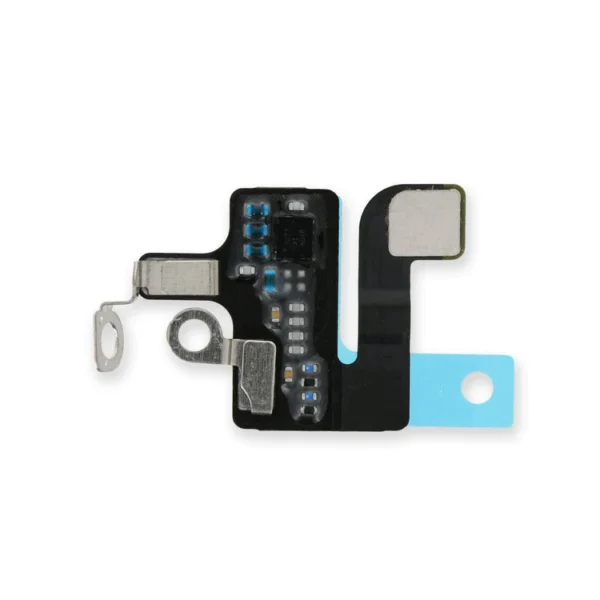
- Replace a torn or missing antenna contact assembly in the top right of the rear case in your iPhone 7.
- Fix Wi-Fi connectivity problems.
| Replace a torn or missing gasket on the SIM card tray for an iPhone 7 or iPhone 7 Plus. This gasket fits just inside the exterior face of the SIM card tray. | Includes 6 gaskets.
Replace any or all of this set of six o-ring gaskets for the power or volume button face posts in an iPhone 7 or iPhone 7 Plus.
Each of the volume button faces and the power button face have two posts that extend to the interior of the phone. Each post has a tiny gasket. That makes six gaskets for one phone or two for each button face. |
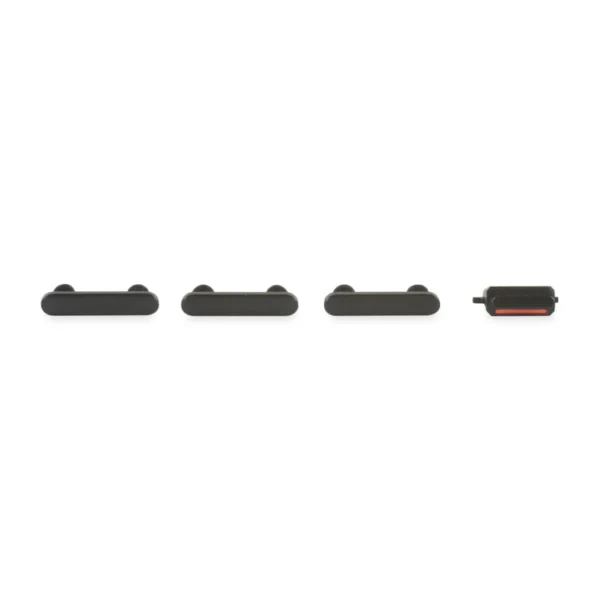
- This set of exterior case buttons includes the Power/Lock Button, Volume Buttons, and the Vibrate/Ring Switch for replacing buttons with cosmetic troubles.
- These are the button parts visible on the outside of the case.
- The actual buttons and switch that do all the work are attached to the internal button cables.
|
| Content | iPhone 7/7 Plus Test Cable for Front Camera and Sensors
- This handy test cable makes it easy to check the functions of an iPhone 7 or iPhone 7 Plus front-facing camera and sensor cable assembly without having to complete the installation and close up the iPhone's case.
- Indispensable to anyone who makes multiple iPhone 7 and iPhone 7 Plus repairs.
- With this cable installed you can connect, test, and quickly swap multiple replacement front-facing camera and sensor cables without wearing out the delicate press fit connectors on the logic board.
| iPhone 7 Front Panel Clips
- Replace the set of three retaining clips in the edges of the rear case.
- These clips help hold the front panel assembly in place.
| iPhone 7 Top Right Antenna
- Replace a torn or missing antenna contact assembly in the top right of the rear case in your iPhone 7.
- Fix Wi-Fi connectivity problems.
| iPhone 7/7 Plus SIM Card Tray Gasket
Replace a torn or missing gasket on the SIM card tray for an iPhone 7 or iPhone 7 Plus. This gasket fits just inside the exterior face of the SIM card tray. | iPhone 7/7 Plus Power and Volume Button Gaskets
Includes 6 gaskets.
Replace any or all of this set of six o-ring gaskets for the power or volume button face posts in an iPhone 7 or iPhone 7 Plus.
Each of the volume button faces and the power button face have two posts that extend to the interior of the phone. Each post has a tiny gasket. That makes six gaskets for one phone or two for each button face. | iPhone 7 Case Button Set
- This set of exterior case buttons includes the Power/Lock Button, Volume Buttons, and the Vibrate/Ring Switch for replacing buttons with cosmetic troubles.
- These are the button parts visible on the outside of the case.
- The actual buttons and switch that do all the work are attached to the internal button cables.
|






Reviews
There are no reviews yet.