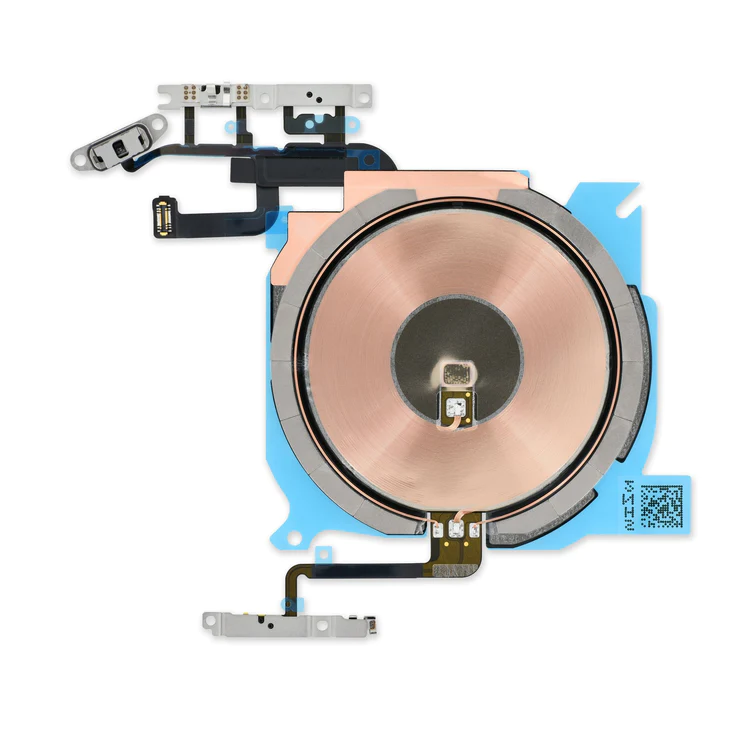
iPhone 13 mini Audio Control Cable and Wireless Charging Antenna

$18.00

  • Replace the cable that connects the internal volume buttons, vibrate/ring switch, and power button to the logic board of your iPhone 13 mini. In addition, this cable includes the Wireless Charging Antenna Coil.
  • Fix issues with volume adjustment, vibration, and cordless charging.

        Note: The external button covers are not included.

SKU: iPhone 13 mini Audio Control Cable and Wireless Charging Antenna Categories: , , , Tag:

Description

iPhone 13 mini Audio Control Cable and Wireless Charging Antenna

  • Replace the cable that connects the internal volume buttons, vibrate/ring switch, and power button to the logic board of your iPhone 13 mini. In addition, this cable includes the Wireless Charging Antenna Coil.
  • Fix issues with volume adjustment, vibration, and cordless charging.

        Note: The external button covers are not included.

Additional information

iPhone 13 mini Parts

IPhones Repair Parts

Reviews

There are no reviews yet.

Be the first to review “iPhone 13 mini Audio Control Cable and Wireless Charging Antenna”

Your email address will not be published. Required fields are marked *

Quick Comparison

iPhone 13 mini Audio Control Cable and Wireless Charging Antenna removeiPhone 5s/5c Test Cable for Lightning Connector removeiPhone 5s/SE (1st Gen) Front Camera and Sensor Cable removeiPhone 5s/SE (1st Gen) LCD Shield Plate removeiPhone 5c Home Button removeiPhone 5s/SE (1st Gen) Bluetooth and Wi-Fi Antenna remove
NameiPhone 13 mini Audio Control Cable and Wireless Charging Antenna removeiPhone 5s/5c Test Cable for Lightning Connector removeiPhone 5s/SE (1st Gen) Front Camera and Sensor Cable removeiPhone 5s/SE (1st Gen) LCD Shield Plate removeiPhone 5c Home Button removeiPhone 5s/SE (1st Gen) Bluetooth and Wi-Fi Antenna remove
ImageiPhone 13 mini part Audio Control Cable and Wireless Charging AntennaiPhone 5s/5c Test Cable for Lightning ConnectoriPhone 5s/SE (1st Gen) Front Camera and Sensor CableiPhone 5s/SE (1st Gen) LCD Shield PlateiPhone 5c Home ButtoniPhone 5s/SE (1st Gen) Wi-Fi Antenna
SKUiPhone 13 mini Audio Control Cable and Wireless Charging AntennaiPhone 5s/5c Test Cable for Lightning ConnectoriPhone 5s Front Camera and Sensor CableiPhone 5s/SE (1st Gen) LCD Shield PlateiPhone 5c Home ButtoniPhone 5s/SE (1st Gen) Antenna
Rating
Rated 0 out of 5
Rated 0 out of 5
Rated 0 out of 5
Rated 0 out of 5
Rated 0 out of 5
Rated 0 out of 5
Price$18.00$11.00$11.00$11.00$8.00$11.00
Stock
Availability
Add to cart

Add to cart

Add to cart

Add to cart

Add to cart

Add to cart

Add to cart

Description
  • Replace the cable that connects the internal volume buttons, vibrate/ring switch, and power button to the logic board of your iPhone 13 mini. In addition, this cable includes the Wireless Charging Antenna Coil.
  • Fix issues with volume adjustment, vibration, and cordless charging.
        Note: The external button covers are not included.
This handy test cable makes it easy to check the functions of a lightning connector assembly without having to complete the installation.
  • Indispensable to anyone who makes multiple iPhone 5s or 5c repairs.
  • With this cable installed in the phone's body you can connect, test, and quickly swap multiple replacement lightning connector assemblies without wearing out the delicate press fit connector on the logic board.
  • Replace a front-facing camera and sensor cable in your iPhone 5s or 1st generation iPhone SE and fix problems with front-facing camera images,
  • poor noise cancelling for phone calls,
  • or malfunctioning screen brightness adjustment.
Replace a bent or missing metal plate between the LCD and the rest of the internal parts in the iPhone 5s or 1st generation iPhone SE.

This shield plate disburses heat and protects the back of the LCD.

Replace a scratched or cracked home button in your iPhone 5 or iPhone 5c.

Keep in mind, this is just a button cover—not the actual actuator that's integrated in the home button cable. So if your home button is not working properly, the button cable is the more likely culprit.

Note:  This new part has no square icon in its center.

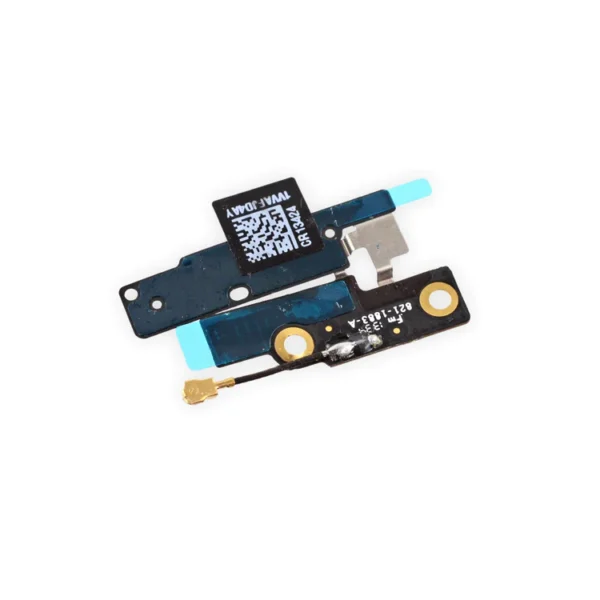
Replace a torn or missing Bluetooth/Wi-Fi Antenna in your iPhone 5s or 1st generation iPhone SE and fix unreliable connections to Wi-Fi and Bluetooth service. If you are experiencing connectivity issues and have a damaged or malfunctioning antenna, replacing this part may make the fix.
Content

iPhone 13 mini Audio Control Cable and Wireless Charging Antenna

  • Replace the cable that connects the internal volume buttons, vibrate/ring switch, and power button to the logic board of your iPhone 13 mini. In addition, this cable includes the Wireless Charging Antenna Coil.
  • Fix issues with volume adjustment, vibration, and cordless charging.
        Note: The external button covers are not included.

iPhone 5s/5c Test Cable for Lightning Connector

  This handy test cable makes it easy to check the functions of a lightning connector assembly without having to complete the installation.
  • Indispensable to anyone who makes multiple iPhone 5s or 5c repairs.
  • With this cable installed in the phone's body you can connect, test, and quickly swap multiple replacement lightning connector assemblies without wearing out the delicate press fit connector on the logic board.

iPhone 5s/SE (1st Gen) Front Camera and Sensor Cable

 
  • Replace a front-facing camera and sensor cable in your iPhone 5s or 1st generation iPhone SE and fix problems with front-facing camera images,
  • poor noise cancelling for phone calls,
  • or malfunctioning screen brightness adjustment.
Note: Some new Front Camera and Sensor Cables will include an extra tab that is used in parts testing

iPhone 5s/SE (1st Gen) LCD Shield Plate

  Replace a bent or missing metal plate between the LCD and the rest of the internal parts in the iPhone 5s or 1st generation iPhone SE.

This shield plate disburses heat and protects the back of the LCD.

Note: This is not the display assembly and does not contain the LCD

iPhone 5c Home Button

Replace a scratched or cracked home button in your iPhone 5 or iPhone 5c.

Keep in mind, this is just a button cover—not the actual actuator that's integrated in the home button cable. So if your home button is not working properly, the button cable is the more likely culprit.

Note:  This new part has no square icon in its center.

iPhone 5s/SE (1st Gen) Bluetooth and Wi-Fi Antenna

  Replace a torn or missing Bluetooth/Wi-Fi Antenna in your iPhone 5s or 1st generation iPhone SE and fix unreliable connections to Wi-Fi and Bluetooth service. If you are experiencing connectivity issues and have a damaged or malfunctioning antenna, replacing this part may make the fix.
WeightN/AN/AN/AN/AN/AN/A
DimensionsN/AN/AN/AN/AN/AN/A
Additional information
iPhone 13 mini Parts

IPhones Repair Parts

IPhone 5s Parts

IPhones Repair Parts

iPhone 5c Parts

IPhone 5s Parts

IPhones Repair Parts

iPhone SE (1st Gen) Parts

IPhone 5s Parts

IPhones Repair Parts

iPhone SE (1st Gen) Parts

iPhone 5c Parts

IPhones Repair Parts

IPhone 5s Parts

IPhones Repair Parts

Select the fields to be shown. Others will be hidden. Drag and drop to rearrange the order.
  • Image
  • SKU
  • Rating
  • Price
  • Stock
  • Availability
  • Add to cart
  • Description
  • Content
  • Weight
  • Dimensions
  • Additional information
Click outside to hide the comparison bar
Compare