| Description |
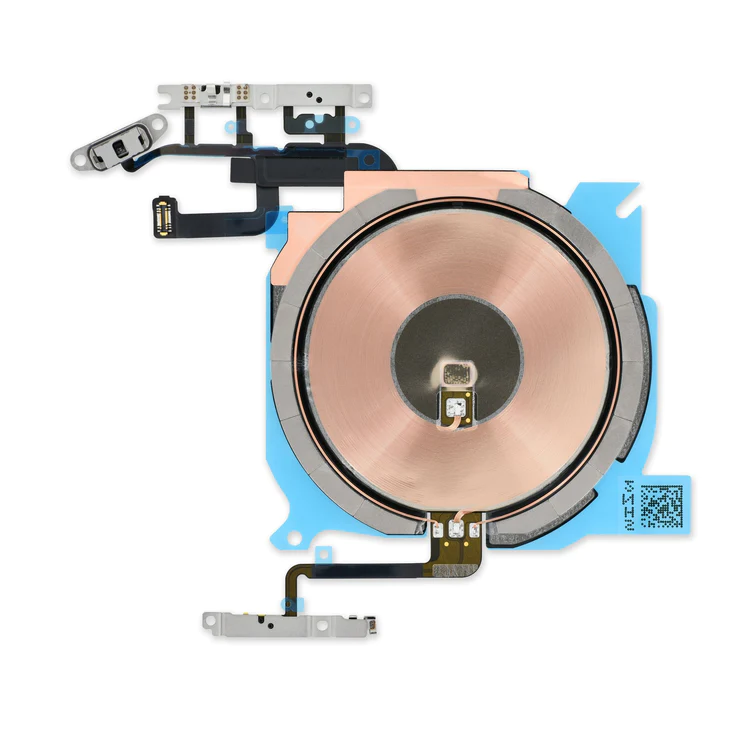
- Replace the cable that connects the internal volume buttons, vibrate/ring switch, and power button to the logic board of your iPhone 13 mini. In addition, this cable includes the Wireless Charging Antenna Coil.
- Fix issues with volume adjustment, vibration, and cordless charging.
Note: The external button covers are not included. | Replace a bent or missing metal bracket securing the front panel assembly cable connectors to the logic board in an iPhone 5s or 1st generation iPhone SE. |
- Replace a dirty, corroded, or damaged lightning connector, or a broken headphone jack in an iPhone 5s.
- This repair may resolve a host of issues like a malfunctioning microphone, slow or nonexistent charging, limited connectivity, or spotty headphone output for your iPhone 5.
| Replace a loudspeaker in your iPhone 5s or 1st generation iPhone SE and fix issues with speakerphone audio output.
An aging or malfunctioning speaker may have buzzing noises or cut out unexpectedly. Restore your phone's sound quality with this replacement part.
Specifications:
| Replace a scratched external lens cover for the rear-facing camera in your iPhone 5s or 1st generation iPhone SE. | Replace a bent or missing metal bracket that secures the home button assembly to the display assembly in your iPhone 5s or 1st generation iPhone SE. |
| Content | iPhone 13 mini Audio Control Cable and Wireless Charging Antenna
- Replace the cable that connects the internal volume buttons, vibrate/ring switch, and power button to the logic board of your iPhone 13 mini. In addition, this cable includes the Wireless Charging Antenna Coil.
- Fix issues with volume adjustment, vibration, and cordless charging.
Note: The external button covers are not included. | iPhone 5s/SE (1st Gen) Front Panel Assembly Cable Bracket
Replace a bent or missing metal bracket securing the front panel assembly cable connectors to the logic board in an iPhone 5s or 1st generation iPhone SE. | iPhone 5s Lightning Connector and Headphone Jack
- Replace a dirty, corroded, or damaged lightning connector, or a broken headphone jack in an iPhone 5s.
- This repair may resolve a host of issues like a malfunctioning microphone, slow or nonexistent charging, limited connectivity, or spotty headphone output for your iPhone 5.
| iPhone 5s/SE (1st Gen) Loudspeaker
Replace a loudspeaker in your iPhone 5s or 1st generation iPhone SE and fix issues with speakerphone audio output.
An aging or malfunctioning speaker may have buzzing noises or cut out unexpectedly. Restore your phone's sound quality with this replacement part.
Specifications:
| iPhone 5s/SE (1st Gen) Rear Camera Lens Cover
Replace a scratched external lens cover for the rear-facing camera in your iPhone 5s or 1st generation iPhone SE. | iPhone 5s/SE (1st Gen) Home Button Bracket
Replace a bent or missing metal bracket that secures the home button assembly to the display assembly in your iPhone 5s or 1st generation iPhone SE. |



Reviews
There are no reviews yet.