| Description |
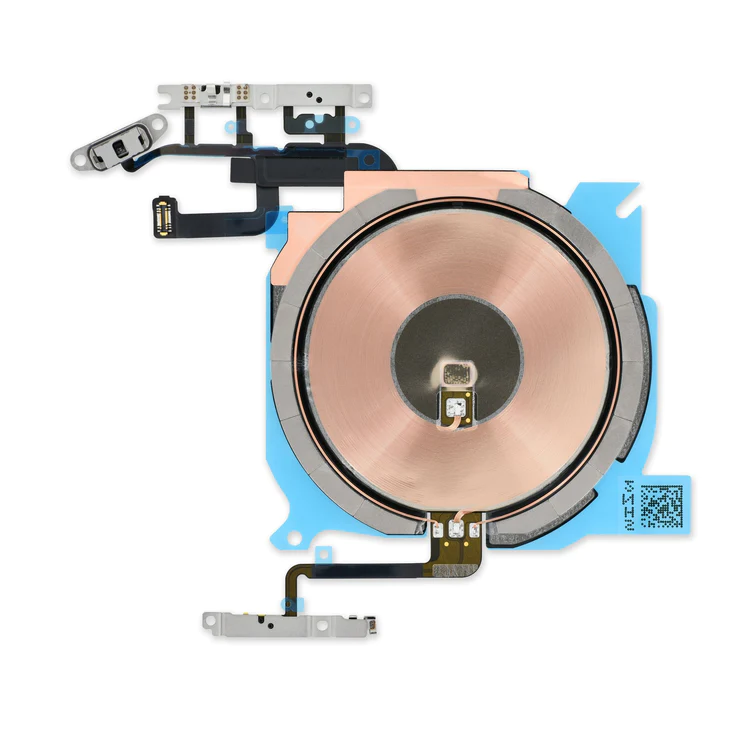
- Replace the cable that connects the internal volume buttons, vibrate/ring switch, and power button to the logic board of your iPhone 13 mini. In addition, this cable includes the Wireless Charging Antenna Coil.
- Fix issues with volume adjustment, vibration, and cordless charging.
Note: The external button covers are not included. |
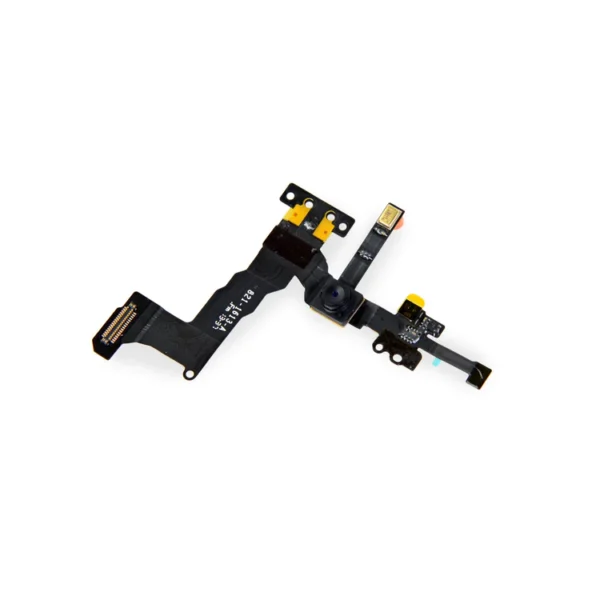
- Replace a front-facing camera and sensor cable in your iPhone 5s or 1st generation iPhone SE and fix problems with front-facing camera images,
- poor noise cancelling for phone calls,
- or malfunctioning screen brightness adjustment.
| This handy test cable makes it easy to check the functions of a lightning connector assembly without having to complete the installation.
- Indispensable to anyone who makes multiple iPhone 5s or 5c repairs.
- With this cable installed in the phone's body you can connect, test, and quickly swap multiple replacement lightning connector assemblies without wearing out the delicate press fit connector on the logic board.
| This iPhone 5s screen replacement includes all of the small parts pre-installed in the assembly, saving time and increasing the quality of your repair.
- New parts tested to strict quality standards.
- 100% factory tested for display performance, including luminance and color balance.
Replace a cracked or scratched front glass panel or malfunctioning LCD display on your iPhone 5s. A new screen and digitizer assembly will renew the appearance of your front panel, restore touch function, and eliminate the dead pixels or flickering on an aging display. | Replace a malfunctioning earpiece speaker in your iPhone 5s or 1st generation iPhone SE and fix problems with phone call audio.
- This is the speaker used to listen while the phone is held to your ear.
- Earpiece speaker functions can be affected by water damage, dust ingress, or a blown speaker.
|
- Replace a dirty, corroded, or damaged lightning connector, or a broken headphone jack in an iPhone 5s.
- This repair may resolve a host of issues like a malfunctioning microphone, slow or nonexistent charging, limited connectivity, or spotty headphone output for your iPhone 5.
|
| Content | iPhone 13 mini Audio Control Cable and Wireless Charging Antenna
- Replace the cable that connects the internal volume buttons, vibrate/ring switch, and power button to the logic board of your iPhone 13 mini. In addition, this cable includes the Wireless Charging Antenna Coil.
- Fix issues with volume adjustment, vibration, and cordless charging.
Note: The external button covers are not included. | iPhone 5s/SE (1st Gen) Front Camera and Sensor Cable
- Replace a front-facing camera and sensor cable in your iPhone 5s or 1st generation iPhone SE and fix problems with front-facing camera images,
- poor noise cancelling for phone calls,
- or malfunctioning screen brightness adjustment.
Note: Some new Front Camera and Sensor Cables will include an extra tab that is used in parts testing | iPhone 5s/5c Test Cable for Lightning Connector
This handy test cable makes it easy to check the functions of a lightning connector assembly without having to complete the installation.
- Indispensable to anyone who makes multiple iPhone 5s or 5c repairs.
- With this cable installed in the phone's body you can connect, test, and quickly swap multiple replacement lightning connector assemblies without wearing out the delicate press fit connector on the logic board.
| iPhone 5s Screen
This iPhone 5s screen replacement includes all of the small parts pre-installed in the assembly, saving time and increasing the quality of your repair.
- New parts tested to strict quality standards.
- 100% factory tested for display performance, including luminance and color balance.
Replace a cracked or scratched front glass panel or malfunctioning LCD display on your iPhone 5s. A new screen and digitizer assembly will renew the appearance of your front panel, restore touch function, and eliminate the dead pixels or flickering on an aging display.
Note: The Touch ID function will only work with your phone's original home button assembly. This replacement part does not include the home button. You will need to transfer the button assembly from your old display to retain Touch ID. | iPhone 5s/SE (1st Gen) Earpiece Speaker
Replace a malfunctioning earpiece speaker in your iPhone 5s or 1st generation iPhone SE and fix problems with phone call audio.
- This is the speaker used to listen while the phone is held to your ear.
- Earpiece speaker functions can be affected by water damage, dust ingress, or a blown speaker.
Note: This is a used OEM part. | iPhone 5s Lightning Connector and Headphone Jack
- Replace a dirty, corroded, or damaged lightning connector, or a broken headphone jack in an iPhone 5s.
- This repair may resolve a host of issues like a malfunctioning microphone, slow or nonexistent charging, limited connectivity, or spotty headphone output for your iPhone 5.
|




Reviews
There are no reviews yet.