| SKU | iPhone 7/7 Plus Power and Volume Button Gaskets | iPhone 7 Audio Control Cable and Brackets | iPhone 6/6s/7 Backlight Diode | iPhone 7 Wi-Fi Diversity Antenna | iPhone 7/7 Plus SIM Card Slot/Reader | iPhone 7/7 Plus Test Cable for Rear Camera |
| Description | Includes 6 gaskets.
Replace any or all of this set of six o-ring gaskets for the power or volume button face posts in an iPhone 7 or iPhone 7 Plus.
Each of the volume button faces and the power button face have two posts that extend to the interior of the phone. Each post has a tiny gasket. That makes six gaskets for one phone or two for each button face. | This cable connects the volume buttons, vibrate/ring switch, and power button to the logic board.
The metal button brackets are included.
Specifications:
| Replace a backlight diode on the logic board of the following iPhone models with their component labels:
- iPhone 6 D1501
- iPhone 6s D4020
- iPhone 7 D3702
Are you learning to microsolder or starting your own board level repair business? This component is included in the Board Component Bundle. | Replace a torn or missing Wi-Fi Diversity Antenna in your iPhone 7 and fix unreliable connections to Wi-Fi signal.
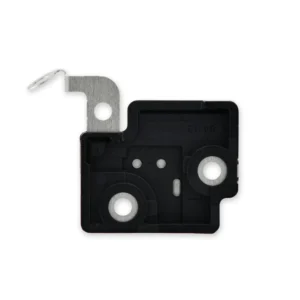
This Wi-Fi antenna and cable is adhered to the loudspeaker in the lower right corner inside the rear case.
Specifications:
|
- Replace a corroded or bent SIM card reader slot and save a logic board from e-waste. This component is surface soldered to the the logic board.
- The SIM card tray is not included.
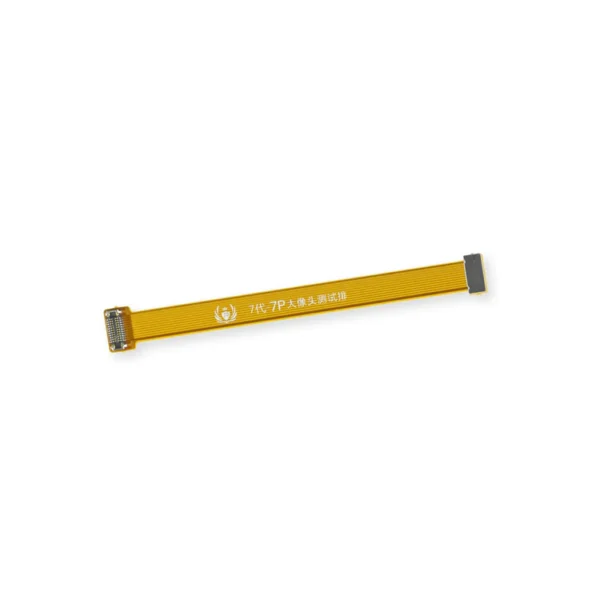
| This handy test cable makes it easy to check the functions of a rear-facing camera in an iPhone 7 or iPhone 7 Plus without having to complete the installation and close up the iPhone's case.
- Indispensable to anyone who makes multiple iPhone 7 or iPhone 7 Plus repairs.
- With this cable installed you can connect, test, and quickly swap multiple replacement rear-facing cameras without wearing out the delicate press fit connectors on the logic board.
Note: This cable fits the connectors for the main and secondary rear-facing cameras in a iPhone 7 Plus, but one cable can only test one camera at a time. |
| Content | iPhone 7/7 Plus Power and Volume Button Gaskets
Includes 6 gaskets.
Replace any or all of this set of six o-ring gaskets for the power or volume button face posts in an iPhone 7 or iPhone 7 Plus.
Each of the volume button faces and the power button face have two posts that extend to the interior of the phone. Each post has a tiny gasket. That makes six gaskets for one phone or two for each button face. | iPhone 7 Audio Control Cable and Brackets
This cable connects the volume buttons, vibrate/ring switch, and power button to the logic board.
The metal button brackets are included.
Specifications:
| iPhone 6/6s/7 Backlight Diode
Replace a backlight diode on the logic board of the following iPhone models with their component labels:
- iPhone 6 D1501
- iPhone 6s D4020
- iPhone 7 D3702
Are you learning to microsolder or starting your own board level repair business? This component is included in the Board Component Bundle. | iPhone 7 Wi-Fi Diversity Antenna
Replace a torn or missing Wi-Fi Diversity Antenna in your iPhone 7 and fix unreliable connections to Wi-Fi signal.
This Wi-Fi antenna and cable is adhered to the loudspeaker in the lower right corner inside the rear case.
Specifications:
| iPhone 7/7 Plus SIM Card Slot/Reader
- Replace a corroded or bent SIM card reader slot and save a logic board from e-waste. This component is surface soldered to the the logic board.
- The SIM card tray is not included.
| iPhone 7/7 Plus Test Cable for Rear Camera
This handy test cable makes it easy to check the functions of a rear-facing camera in an iPhone 7 or iPhone 7 Plus without having to complete the installation and close up the iPhone's case.
- Indispensable to anyone who makes multiple iPhone 7 or iPhone 7 Plus repairs.
- With this cable installed you can connect, test, and quickly swap multiple replacement rear-facing cameras without wearing out the delicate press fit connectors on the logic board.
Note: This cable fits the connectors for the main and secondary rear-facing cameras in a iPhone 7 Plus, but one cable can only test one camera at a time. |




Reviews
There are no reviews yet.