| Description |
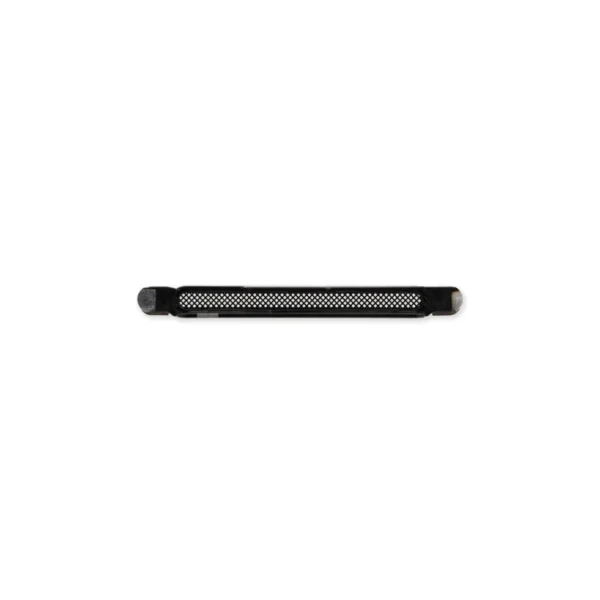
- Replace a punctured or missing mesh covering the earpiece speaker opening compatible with an iPhone 13, 13 mini, 13 Pro, 13 Pro Max, 14, 14 Plus, 14 Pro, or 14 Pro Max.
- Keep dust and dirt from blocking the earpiece speaker.
Note: Installation adhesive is not included. |
- Replace the cable that connects the internal volume buttons, vibrate/ring switch, and power button to the logic board of your iPhone 13. In addition, this cable includes the Wireless Charging Antenna Coil.
- Fix issues with volume adjustment, vibration, and cordless charging.
Note: The external button covers are not included. |
- Replace the two external lens covers for the rear-facing cameras compatible with an iPhone 13 or iPhone 13 mini.
- Installation adhesive is included.
Note: Only the lens cover glass is included. The lens cover bezels and rings are not included. |
- Replace a dual rear-facing camera assembly in your iPhone 14.
- If your rear camera has sensor issues, focusing problems, or shows a blank image, you’ll want to replace this part.
Note: If your photos look like you have a scratched lens, this part will not solve the issue. The lens opening in your rear case may be scratched.
Specifications:
Part Number
821-03851 |
- Replace a scratched or cracked front panel glass digitizer screen or a malfunctioning Super Retina XDR OLED display. This part is compatible with an iPhone 14.
- New parts tested to strict quality standards.
- 100% factory tested for display performance, including luminance and color balance.
- A 6.1 inch OLED multitouch 1170 x 2532 display featuring organic light-emitting diode (OLED) technology; a significant improvement over more standard liquid crystal displays (LCD). This screen measures up closest to the original OLED display specifications.
- A new screen and digitizer assembly will renew the appearance of your front panel, restore touch function, and eliminate the dead pixels or flickering on an aging display.
Note:
- True Tone functionality is disabled after a screen replacement, even when using an original Apple screen.
- The upper sensor assembly is not included.
- The upper sensor cable assembly on the back of the display is paired to your iPhone's logic board and must be transferred from your old display to your new one. The sensor assembly includes the flood illuminator, a part of the Face ID security feature. If it is damaged or replaced, Face ID will cease to function.
Specifications:
Display Panel
Aftermarket OLED |
- This iPhone 14 replacement battery is what you need to bring your dead iPhone back to life!
- Tested to confirm there are no cycles on the cell and the capacity is 95% or higher.
- 100% factory tested with a customer return rate of only 1%.
- Assembled using high quality chipset from Texas Instruments.
- Battery adhesive is preinstalled to improve the quality of your repair.
- Battery degradation is an inevitable part of the lifespan of your iPhone 14. Extend the life of your phone with this new replacement battery. If your iPhone 14 won't turn on, is stuck in a boot loop, has a "service battery" warning, or simply won't hold a charge, this replacement battery may be what you need to fix it.
- For optimal performance, calibrate your newly installed battery: Charge it to 100% and keep charging it for at least 2 more hours. Then use your device until it shuts off due to low battery. Finally, charge it uninterrupted to 100%.
Specifications:
Battery Model #
A2863
Watt Hours
12.86 Wh
Voltage
3.87 V
Milliamp Hours
3279 mAh
Manufacturer
Aftermarket
Note:
- After replacing your battery the Battery Health feature on your phone will display "Service" and a message about needing to have your phone checked by an authorized service provider.
- Rest assured that the battery and your phone are fine. iOS shows this message anytime a battery is replaced by anyone other than an authorized service provider.
- Your phone will function 100% normally other than Battery Health not reporting the health of the battery.
|
| Content | iPhone 13/14 Earpiece Speaker Mesh
- Replace a punctured or missing mesh covering the earpiece speaker opening compatible with an iPhone 13, 13 mini, 13 Pro, 13 Pro Max, 14, 14 Plus, 14 Pro, or 14 Pro Max.
- Keep dust and dirt from blocking the earpiece speaker.
Note: Installation adhesive is not included. | iPhone 13 Audio Control Cable and Wireless Charging Antenna
- Replace the cable that connects the internal volume buttons, vibrate/ring switch, and power button to the logic board of your iPhone 13. In addition, this cable includes the Wireless Charging Antenna Coil.
- Fix issues with volume adjustment, vibration, and cordless charging.
Note: The external button covers are not included.
| iPhone 13/13 mini Rear Camera Lens Covers
- Replace the two external lens covers for the rear-facing cameras compatible with an iPhone 13 or iPhone 13 mini.
- Installation adhesive is included.
Note: Only the lens cover glass is included. The lens cover bezels and rings are not included. | iPhone 14 Rear Camera Assembly
- Replace a dual rear-facing camera assembly in your iPhone 14.
- If your rear camera has sensor issues, focusing problems, or shows a blank image, you’ll want to replace this part.
Note: If your photos look like you have a scratched lens, this part will not solve the issue. The lens opening in your rear case may be scratched.
Specifications:
Part Number
821-03851 | iPhone 14 Screen
- Replace a scratched or cracked front panel glass digitizer screen or a malfunctioning Super Retina XDR OLED display. This part is compatible with an iPhone 14.
- New parts tested to strict quality standards.
- 100% factory tested for display performance, including luminance and color balance.
- A 6.1 inch OLED multitouch 1170 x 2532 display featuring organic light-emitting diode (OLED) technology; a significant improvement over more standard liquid crystal displays (LCD). This screen measures up closest to the original OLED display specifications.
- A new screen and digitizer assembly will renew the appearance of your front panel, restore touch function, and eliminate the dead pixels or flickering on an aging display.
Note:
- True Tone functionality is disabled after a screen replacement, even when using an original Apple screen.
- The upper sensor assembly is not included.
- The upper sensor cable assembly on the back of the display is paired to your iPhone's logic board and must be transferred from your old display to your new one. The sensor assembly includes the flood illuminator, a part of the Face ID security feature. If it is damaged or replaced, Face ID will cease to function.
Specifications:
Display Panel
Aftermarket OLED | iPhone 14 Battery
- This iPhone 14 replacement battery is what you need to bring your dead iPhone back to life!
- Tested to confirm there are no cycles on the cell and the capacity is 95% or higher.
- 100% factory tested with a customer return rate of only 1%.
- Assembled using high quality chipset from Texas Instruments.
- Battery adhesive is preinstalled to improve the quality of your repair.
- Battery degradation is an inevitable part of the lifespan of your iPhone 14. Extend the life of your phone with this new replacement battery. If your iPhone 14 won't turn on, is stuck in a boot loop, has a "service battery" warning, or simply won't hold a charge, this replacement battery may be what you need to fix it.
- For optimal performance, calibrate your newly installed battery: Charge it to 100% and keep charging it for at least 2 more hours. Then use your device until it shuts off due to low battery. Finally, charge it uninterrupted to 100%.
Specifications:
Battery Model #
A2863
Watt Hours
12.86 Wh
Voltage
3.87 V
Milliamp Hours
3279 mAh
Manufacturer
Aftermarket
Note:
- After replacing your battery the Battery Health feature on your phone will display "Service" and a message about needing to have your phone checked by an authorized service provider.
- Rest assured that the battery and your phone are fine. iOS shows this message anytime a battery is replaced by anyone other than an authorized service provider.
- Your phone will function 100% normally other than Battery Health not reporting the health of the battery.
|




Reviews
There are no reviews yet.