| Description |
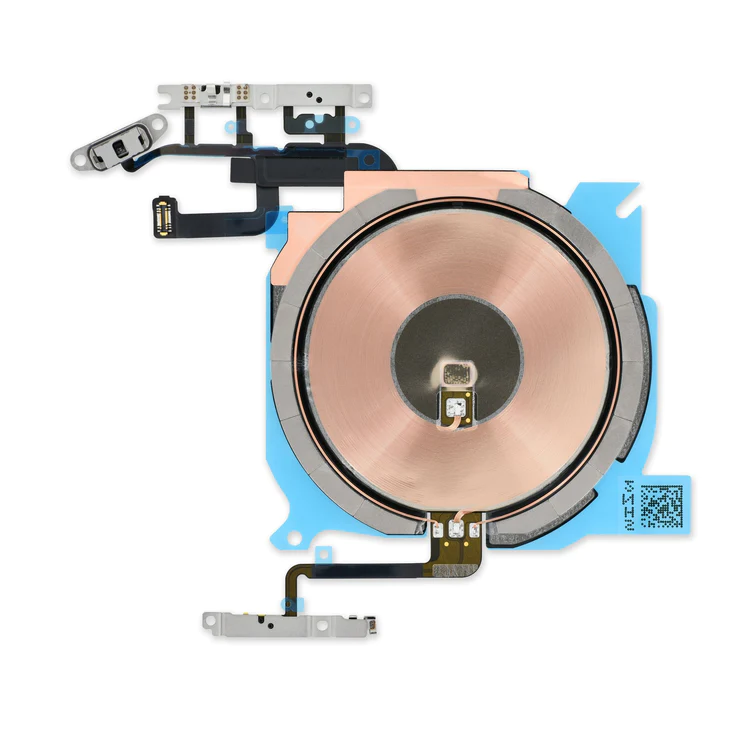
- Replace the cable that connects the internal volume buttons, vibrate/ring switch, and power button to the logic board of your iPhone 13 mini. In addition, this cable includes the Wireless Charging Antenna Coil.
- Fix issues with volume adjustment, vibration, and cordless charging.
Note: The external button covers are not included. | Protect the display on your iPhone 5, 5s, 5c, or 1st generation SE from impacts and scratches with this precise laser-cut screen protector.
- Nu Glass Tempered Glass Screen Protector features an advanced silicone adhesion chemical for easy application, four-tiered layer composition (anti-scratch, oleophobic coating, heat resistance and electrostatic adhesion), so your phone will always be protected.
- Each pack contains one set of Nu Glass Tempered Glass Screen Protector
| Replace a malfunctioning earpiece speaker in your iPhone 5s or 1st generation iPhone SE and fix problems with phone call audio.
- This is the speaker used to listen while the phone is held to your ear.
- Earpiece speaker functions can be affected by water damage, dust ingress, or a blown speaker.
| Replace a bent or missing metal plate between the LCD and the rest of the internal parts in the iPhone 5s or 1st generation iPhone SE.
This shield plate disburses heat and protects the back of the LCD. | Replace a scratched or cracked home button in your iPhone 5 or iPhone 5c.
Keep in mind, this is just a button cover—not the actual actuator that's integrated in the home button cable. So if your home button is not working properly, the button cable is the more likely culprit.
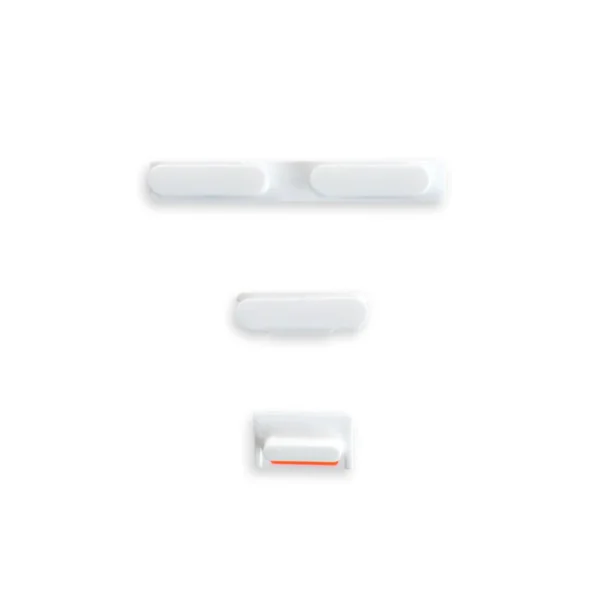
Note: This new part has no square icon in its center. | Replace a damaged or missing exterior button face for the power/lock button, volume buttons, and vibrate/ring switch for the iPhone 5c.
Note: These are just the button parts visible on the outside of the rear case. You will need to transfer the wire hinge from your current power button. The actual buttons and switch that do all the work are attached to the Audio Control and Power Button Cable. If you are experiencing issues with your buttons not working it may actually be the Audio control & Power button cable that's bad. |
| Content | iPhone 13 mini Audio Control Cable and Wireless Charging Antenna
- Replace the cable that connects the internal volume buttons, vibrate/ring switch, and power button to the logic board of your iPhone 13 mini. In addition, this cable includes the Wireless Charging Antenna Coil.
- Fix issues with volume adjustment, vibration, and cordless charging.
Note: The external button covers are not included. | Nu Glass Tempered Glass Screen Protector for iPhone 5/5s/5c/SE (1st Gen)
Protect the display on your iPhone 5, 5s, 5c, or 1st generation SE from impacts and scratches with this precise laser-cut screen protector.
- Nu Glass Tempered Glass Screen Protector features an advanced silicone adhesion chemical for easy application, four-tiered layer composition (anti-scratch, oleophobic coating, heat resistance and electrostatic adhesion), so your phone will always be protected.
- Each pack contains one set of Nu Glass Tempered Glass Screen Protector
| iPhone 5s/SE (1st Gen) Earpiece Speaker
Replace a malfunctioning earpiece speaker in your iPhone 5s or 1st generation iPhone SE and fix problems with phone call audio.
- This is the speaker used to listen while the phone is held to your ear.
- Earpiece speaker functions can be affected by water damage, dust ingress, or a blown speaker.
Note: This is a used OEM part. | iPhone 5s/SE (1st Gen) LCD Shield Plate
Replace a bent or missing metal plate between the LCD and the rest of the internal parts in the iPhone 5s or 1st generation iPhone SE.
This shield plate disburses heat and protects the back of the LCD.
Note: This is not the display assembly and does not contain the LCD | iPhone 5c Home Button
Replace a scratched or cracked home button in your iPhone 5 or iPhone 5c.
Keep in mind, this is just a button cover—not the actual actuator that's integrated in the home button cable. So if your home button is not working properly, the button cable is the more likely culprit.
Note: This new part has no square icon in its center. | iPhone 5c Case Button Set
Replace a damaged or missing exterior button face for the power/lock button, volume buttons, and vibrate/ring switch for the iPhone 5c.
Note: These are just the button parts visible on the outside of the rear case. You will need to transfer the wire hinge from your current power button. The actual buttons and switch that do all the work are attached to the Audio Control and Power Button Cable. If you are experiencing issues with your buttons not working it may actually be the Audio control & Power button cable that's bad. |





Reviews
There are no reviews yet.