| Description |
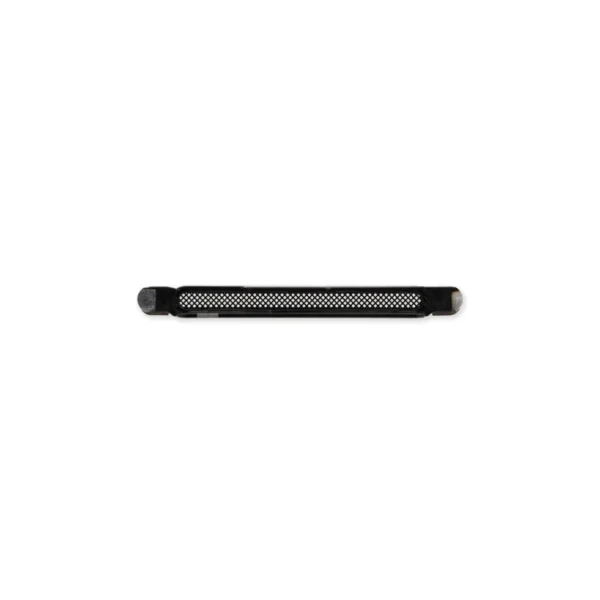
- Replace a punctured or missing mesh covering the earpiece speaker opening compatible with an iPhone 13, 13 mini, 13 Pro, 13 Pro Max, 14, 14 Plus, 14 Pro, or 14 Pro Max.
- Keep dust and dirt from blocking the earpiece speaker.
Note: Installation adhesive is not included. |
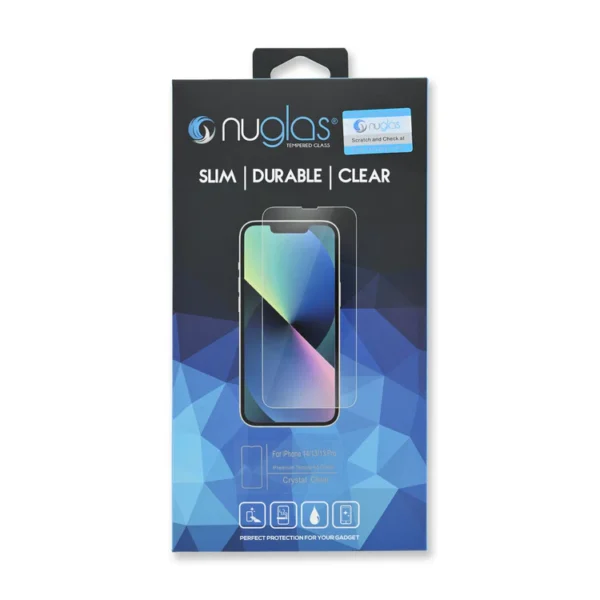
- Protect the display on your iPhone 13, iPhone 13 Pro, or iPhone 14 from impacts and scratches with this precise laser-cut screen protector.
- NuGlas Tempered Glass Screen Protector features an advanced silicone adhesion chemical for easy application, four-tiered layer composition (anti-scratch, oleophobic coating, heat resistance and electrostatic adhesion), so your phone will always be protected.
Each pack contains one set of NuGlas Tempered Glass Screen Protector.
|
- This iPhone 13 replacement battery is what you need to bring your dead iPhone back to life!
- Tested to confirm there are no cycles on the cell and the capacity is 95% or higher.
- 100% factory tested with a customer return rate of only 1%.
- Assembled using high quality chipset from Texas Instruments.
- Battery adhesive is preinstalled to improve the quality of your repair.
- Battery degradation is an inevitable part of the lifespan of your iPhone 13. Extend the life of your phone with this new replacement battery. If your iPhone 13 won't turn on, is stuck in a boot loop, has a "service
- battery" warning, or simply won't hold a charge, this replacement battery may be what you need to fix it
- For optimal performance, calibrate your newly installed battery: Charge it to 100% and keep charging it for at least 2 more hours. Then use your device until it shuts off due to low battery. Finally, charge it uninterrupted to 100%.
Note: After replacing your battery the Battery Health feature on your phone will display "Service" and a message about needing to have your phone checked by an authorized service provider. Rest assured that the battery and your phone are fine. iOS shows this message anytime a battery is replaced by anyone other than an authorized service provider. Your phone will function 100% normally other than Battery Health not reporting the health of the battery. |
- Replace a scratched or cracked front panel glass digitizer screen or a malfunctioning Super Retina XDR OLED display. This part is compatible with an iPhone 14.
- New parts tested to strict quality standards.
- 100% factory tested for display performance, including luminance and color balance.
- A 6.1 inch OLED multitouch 1170 x 2532 display featuring organic light-emitting diode (OLED) technology; a significant improvement over more standard liquid crystal displays (LCD). This screen measures up closest to the original OLED display specifications.
- A new screen and digitizer assembly will renew the appearance of your front panel, restore touch function, and eliminate the dead pixels or flickering on an aging display.
Note:
- True Tone functionality is disabled after a screen replacement, even when using an original Apple screen.
- The upper sensor assembly is not included.
- The upper sensor cable assembly on the back of the display is paired to your iPhone's logic board and must be transferred from your old display to your new one. The sensor assembly includes the flood illuminator, a part of the Face ID security feature. If it is damaged or replaced, Face ID will cease to function.
Specifications:
Display Panel
Aftermarket OLED | Replace a torn or malfunctioning front sensor cable in your iPhone 14.
Note: The Front Sensor Assembly is paired to the logic board in an iPhone 14. This cable contains sensors that are part of the Face ID security feature. Replacing this cable will not restore Face ID functions. |
- Replace a malfunctioning front-facing camera assembly and restore selfie camera functions.
- Replacing the front camera assembly will not restore facial recognition functions or any other infrared camera functions. These components are paired to the logic board for security reasons, and Face ID will only
- function with the original paired camera. Only standard photography functions will be restored with a replacement camera assembly.
Specifications:
Part Number
821-03153, 821-03181 |
| Content | iPhone 13/14 Earpiece Speaker Mesh
- Replace a punctured or missing mesh covering the earpiece speaker opening compatible with an iPhone 13, 13 mini, 13 Pro, 13 Pro Max, 14, 14 Plus, 14 Pro, or 14 Pro Max.
- Keep dust and dirt from blocking the earpiece speaker.
Note: Installation adhesive is not included. | NuGlas Tempered Glass Screen Protector for iPhone 13/13 Pro/14
- Protect the display on your iPhone 13, iPhone 13 Pro, or iPhone 14 from impacts and scratches with this precise laser-cut screen protector.
- NuGlas Tempered Glass Screen Protector features an advanced silicone adhesion chemical for easy application, four-tiered layer composition (anti-scratch, oleophobic coating, heat resistance and electrostatic adhesion), so your phone will always be protected.
Each pack contains one set of NuGlas Tempered Glass Screen Protector.
| iPhone 13 Battery
- This iPhone 13 replacement battery is what you need to bring your dead iPhone back to life!
- Tested to confirm there are no cycles on the cell and the capacity is 95% or higher.
- 100% factory tested with a customer return rate of only 1%.
- Assembled using high quality chipset from Texas Instruments.
- Battery adhesive is preinstalled to improve the quality of your repair.
- Battery degradation is an inevitable part of the lifespan of your iPhone 13. Extend the life of your phone with this new replacement battery. If your iPhone 13 won't turn on, is stuck in a boot loop, has a "service
- battery" warning, or simply won't hold a charge, this replacement battery may be what you need to fix it
- For optimal performance, calibrate your newly installed battery: Charge it to 100% and keep charging it for at least 2 more hours. Then use your device until it shuts off due to low battery. Finally, charge it uninterrupted to 100%.
Battery Model #
A2655
Watt Hours
12.41 Wh
Voltage
3.84 V
Milliamp Hours
3227 mAh
Note: After replacing your battery the Battery Health feature on your phone will display "Service" and a message about needing to have your phone checked by an authorized service provider. Rest assured that the battery and your phone are fine. iOS shows this message anytime a battery is replaced by anyone other than an authorized service provider. Your phone will function 100% normally other than Battery Health not reporting the health of the battery. | iPhone 14 Screen
- Replace a scratched or cracked front panel glass digitizer screen or a malfunctioning Super Retina XDR OLED display. This part is compatible with an iPhone 14.
- New parts tested to strict quality standards.
- 100% factory tested for display performance, including luminance and color balance.
- A 6.1 inch OLED multitouch 1170 x 2532 display featuring organic light-emitting diode (OLED) technology; a significant improvement over more standard liquid crystal displays (LCD). This screen measures up closest to the original OLED display specifications.
- A new screen and digitizer assembly will renew the appearance of your front panel, restore touch function, and eliminate the dead pixels or flickering on an aging display.
Note:
- True Tone functionality is disabled after a screen replacement, even when using an original Apple screen.
- The upper sensor assembly is not included.
- The upper sensor cable assembly on the back of the display is paired to your iPhone's logic board and must be transferred from your old display to your new one. The sensor assembly includes the flood illuminator, a part of the Face ID security feature. If it is damaged or replaced, Face ID will cease to function.
Specifications:
Display Panel
Aftermarket OLED | iPhone 14 Front Sensor Cable
Replace a torn or malfunctioning front sensor cable in your iPhone 14.
Note: The Front Sensor Assembly is paired to the logic board in an iPhone 14. This cable contains sensors that are part of the Face ID security feature. Replacing this cable will not restore Face ID functions. | iPhone 13 Front Camera Assembly
- Replace a malfunctioning front-facing camera assembly and restore selfie camera functions.
- Replacing the front camera assembly will not restore facial recognition functions or any other infrared camera functions. These components are paired to the logic board for security reasons, and Face ID will only
- function with the original paired camera. Only standard photography functions will be restored with a replacement camera assembly.
Specifications:
Part Number
821-03153, 821-03181 |




Reviews
There are no reviews yet.